Following Diffusion research across robotics and machine learning takes more than picking one arXiv category. Start with an OR group for the categories, then require Diffusion in the abstract. This keeps either field eligible while making the method the shared condition.
The result is a reading list you can preview, adjust, and follow through RSS. It is a literal metadata filter: it finds mentions of a term, rather than deciding whether a paper makes a scientific contribution to that topic.
Why one category can miss useful work
An arXiv subject describes where a paper is classified, which is not always the same as the method you want to follow. Robot learning and generative modeling can share techniques while appearing in different subjects.
For a concrete example, Diffusion Policy is classified in robotics, cs.RO. Denoising Diffusion Probabilistic Models has machine learning classifications, cs.LG and stat.ML. Their records show why a method-based reading list can benefit from multiple categories.
These are historical examples, not a promise that either appears in the current preview. The landing-page demo searches the last two weeks of indexed papers. Open the original arXiv records for the full papers and their latest versions.
Build the category group first
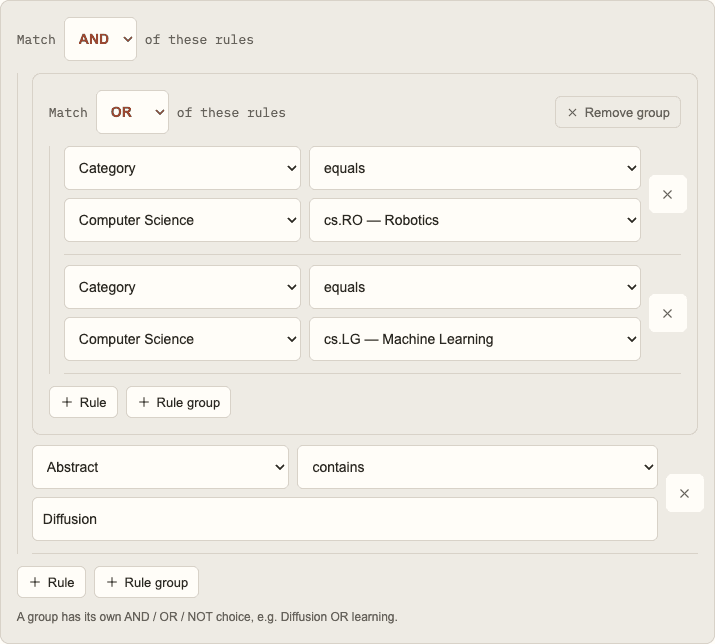
In the filter editor, use an outer group set to AND, then add an inner group set to OR. Place the two category conditions inside that inner group:
Match ALL of these rules:
  Match ANY of these rules:
    Category equals cs.RO
    Category equals cs.LG
  Abstract contains Diffusion
The OR group means a paper can belong to either robotics or machine learning. The outer AND means the abstract still has to contain Diffusion.
Requiring both categories with AND would create a different filter: only papers carrying both classifications could qualify. That can be useful for a narrow cross-listing search, but it is not the broad reading list described here.
The button opens the demo with the complete condition tree filled in. You can inspect and edit it before running a preview; opening the example does not save a filter or create an account.
Choose the field that fits your question
A title condition is concise, but it can miss relevant terminology that only appears in the abstract. An abstract condition gives you more context and is a reasonable starting point for a method-based feed.
| Search field | Useful when | Tradeoff |
|---|---|---|
| Title | You want the method named prominently | Papers can discuss the method without naming it in the title |
| Abstract | You want a broader view of method mentions | Baselines and background discussion can also match |
| All fields | You also care about comments or journal-reference text | More places to match can produce more noise |
Paper Observatory's All fields option searches the title, abstract, comments, and journal reference. Authors and categories have their own conditions. The usage guide explains the complete field list and how groups behave.
Make a second, narrower filter
Keep the broad filter as a discovery feed. If you are working on a particular robotics problem, create a separate filter for that task rather than immediately narrowing every result out of the original feed.
For example, add Abstract contains manipulation to the outer AND group. Now a paper must have an eligible category, mention Diffusion, and mention manipulation in its abstract. Alternatively, use policy if that is the aspect you want to follow.
Inspect the preview before treating either term as a quality check. A paper might describe manipulation as background or compare against a Diffusion method without adopting it. Read the abstract and open the paper to decide whether it belongs on your reading list.
Avoid adding several narrow conditions at once. When a preview goes empty, changing one condition at a time makes it easier to see which requirement removed the papers you expected.
Preview without assuming archive-wide coverage
The demo returns up to ten recent matching papers from a two-week window. That is a useful way to test a filter, but it does not estimate the total amount of Diffusion research or measure future alert volume.
If there are no results:
- Remove the task-specific condition and preview the broader filter.
- Check whether the category group is OR rather than AND.
- Try the abstract field if you started with the title.
- Review the index coverage and the service status if the data appears stale.
Text matching ignores letter case, so Diffusion and diffusion match the same text. It does not infer synonyms or expand abbreviations. If you need multiple phrases, make an OR group for them and inspect the resulting matches.
Save a feed you can maintain
Once the results look useful, give the filter a clear name, such as Diffusion across robotics and ML. After saving, you can read matches in the dashboard or use a per-filter RSS URL to follow this interest in a reader. A combined RSS feed lets you follow several interests together.
The RSS reader decides when to refresh its subscription. Paper Observatory checks arXiv updates through its background worker; neither action changes arXiv's own publication schedule. See arXiv's metadata documentation for how records become available.
Revisit the filter as your project changes. Pause it when you no longer need new matches, or split a broad interest into separate discovery and task-specific filters. For more tuning examples, read how to reduce noise in arXiv alerts.