A useful paper alert needs a clear subject boundary, a distinctive search term, and a way to test the results. Use AND to require the parts of your interest, OR to cover alternative wording, and NOT only for exclusions you have inspected. Start with a small filter and refine one rule at a time.
This article uses a language-research example: retrieval-augmented work in cs.CL, with an optional exclusion for titles containing survey. The same process applies to robotics, mathematical methods, or another subject in the topic directory.
Diagnose the noise before adding conditions
Open several unexpected results and ask why they matched. There are different reasons a feed can feel noisy, and each suggests a different change.
| What you see | Likely issue | First adjustment |
|---|---|---|
| Papers from unrelated research areas | The subject boundary is too broad | Add a category or a category OR group |
| A method appears only as background | The search term is not central to the paper | Try the title, or add a task with AND |
| Similar papers use different terminology | One phrase is too narrow | Put the phrases in an OR group |
| Many overview papers when you need new methods | A paper-type preference is missing | Test a title exclusion, then check what it removes |
Do not add a new rule simply because one result was disappointing. A condition affects every future match, including papers you have not seen yet. A small, understandable filter is easier to maintain than a collection of exclusions with no clear purpose.
Use AND for different requirements
Suppose your interest is retrieval-augmented language research. A category condition provides the subject boundary; a text condition identifies the technique. Both requirements belong in the outer AND group.
For context, the original retrieval-augmented generation paper illustrates the terminology behind the example. It is a historical reference, not a current preview result or a complete description of this research area.
A category alone would include many other language papers. A broad substring such as retrieval without a subject condition could also bring in work from other areas. Combining the two makes the intended boundary explicit.
Use OR for alternative wording
Literal phrase matching will not automatically treat retrieval-augmented and retrieval augmented as equivalent. Put those abstract conditions in an OR group so either spelling can satisfy the technique requirement.
Match ALL of these rules:
  Category equals cs.CL
  Match ANY of these rules:
    Abstract contains retrieval-augmented
    Abstract contains retrieval augmented
An abbreviation requires particular care. Contains does not enforce word boundaries: a short string can occur inside a longer word. For example, searching for RAG can also match the letters in fragment. Case-insensitive matching does not remove that ambiguity.
Start with the distinctive long phrases. If you later add an abbreviation, inspect the preview and decide whether the extra recall is worth the extra noise. The app does not infer synonyms or identify the intended meaning of an acronym.
Put an exclusion where it belongs
If you want to omit records with survey in the title, add a NOT group containing one title condition. That produces this complete example:
Match ALL of these rules:
  Category equals cs.CL
  Match ANY of these rules:
    Abstract contains retrieval-augmented
    Abstract contains retrieval augmented
  Exclude:
    Title contains survey
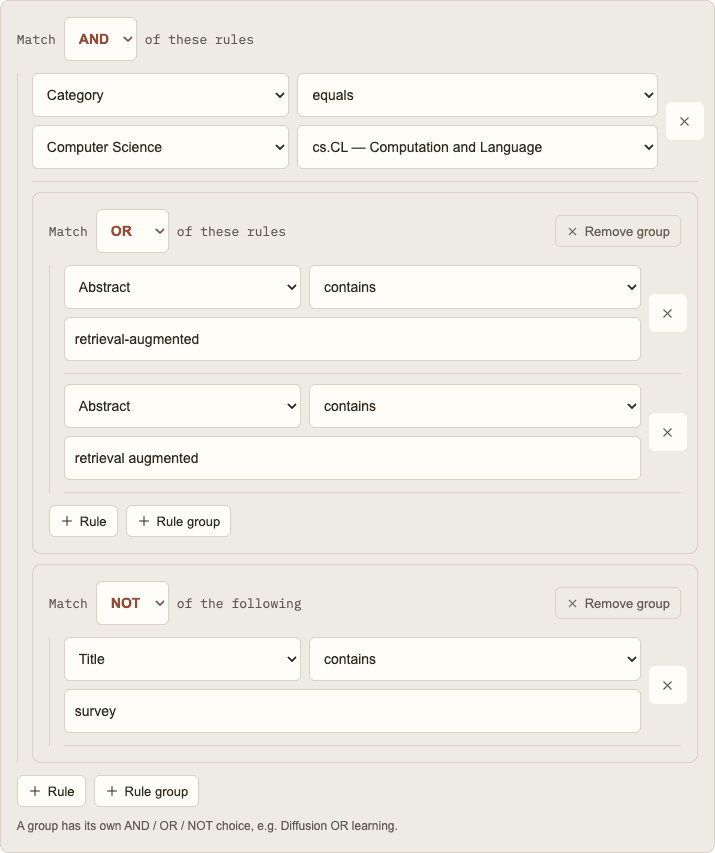
NOT takes one child: a single condition or a group. To exclude several alternatives, put an OR group inside NOT. To require that several conditions all match, use AND instead of trying to describe that behavior with several separate negations.
The survey rule is a title substring test, not a classifier for paper types. It can remove an original contribution with survey in its title and keep an overview that uses different language. Run the filter both with and without the exclusion and inspect the difference before keeping it.
Useful review articles may also deserve their own filter. Separating an overview reading list from a methods reading list often makes both easier to use.
Choose title and abstract deliberately
Title matching can make a topic more prominent in the results, but it also narrows what you will see. Abstract matching covers more contextual discussion and can catch relevant work whose title describes an application instead of the technique.
For a specific system or dataset, try an abstract condition first. For a distinctive named method, compare the title and abstract previews. Keep the field that best fits your reading goal rather than assuming one is always better.
Avoid requiring optional metadata until you know it is present on the papers you need. A DOI or journal-reference condition can omit records that have not supplied those fields. That omission is a consequence of the rule, not necessarily a missing paper in the source archive.
Treat an empty preview as a debugging signal
The landing-page demo checks the last two weeks of indexed papers and shows up to ten recent matches. Zero results does not prove that the research topic is inactive or that the filter will never receive papers.
Work backward through the conditions:
- Remove the exclusion and preview again.
- Remove the narrowest keyword requirement.
- Check whether a category group accidentally requires all categories.
- Try alternative wording in an OR group.
- Confirm that the field matches where the information actually appears.
When testing a new condition, keep a note of what you expected it to change. That makes future revisions deliberate and helps you explain a filter to a collaborator.
Keep the reading workflow simple
Save a broad discovery filter and a focused project filter if both are useful. Give them names that describe their boundaries so the resulting RSS entries or email digests are easy to interpret.
Pause a filter when the project ends, and revisit a working filter when terminology changes. An exclusion that made sense early in a project may later hide exactly the background material you need.
The usage guide covers the editor controls. If you are starting from scratch, follow the complete arXiv keyword alerts tutorial from your first rule to RSS or email delivery. For an example with multiple research categories, see tracking Diffusion papers. For a feed organized around people instead of topics, see arXiv author alerts.