To set up arXiv author alerts, create a filter on the Author field, preview the recorded name matches, and save the filter. Then subscribe to its per-filter RSS URL in your reader or enable email delivery with Pro. You can keep an author feed separate or combine it with your other research interests.
An author filter matches names supplied in paper metadata. It is not an identity resolver: identical names, abbreviations, or spelling differences can affect the results. Checking a known arXiv record is an important first step.
Start from the name on an actual paper
Open a paper by the researcher and inspect its author list. Copy the recorded name rather than guessing how initials or surnames have been represented.
For example, the Diffusion Policy record lists Shuran Song among its authors. That name is used in the editable example below. The paper is a historical reference; it may be outside the recent window shown by the demo.
Match ALL of these rules:
  Author contains Shuran Song
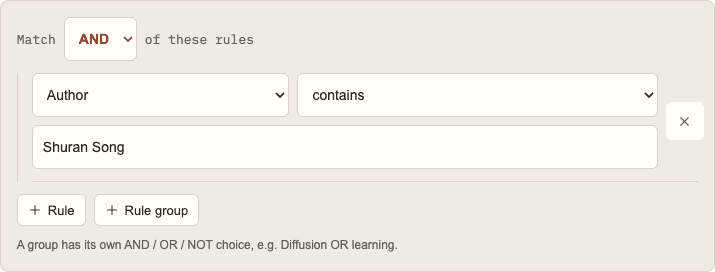
The example only supplies a starting value. Replace it with the researcher you want to follow, run the preview, and inspect the author lists on the results. Opening the example does not subscribe you to a feed or send an email.
A filter matches when one recorded author name satisfies the condition. It is not restricted to the first author, corresponding author, or the person who submitted the arXiv record.
Decide between contains and equals
Both operators are case-insensitive. Equals requires a complete recorded author name to equal your value. Contains checks whether the value occurs within one recorded name.
| Condition | What it does | When to use it |
|---|---|---|
| Author equals a full name | Requires that complete recorded name | When you know the name format and want a precise condition |
| Author contains a full name | Allows extra text around the matched phrase | When a longer recorded name may include the phrase |
| Author contains a surname | Matches that substring in any recorded author name | As an exploratory search that needs careful inspection |
Contains will not automatically bridge an inserted middle initial. A space and a missing initial are still literal characters. If metadata uses more than one form, add the observed forms as separate author conditions in an OR group.
Short surnames or initials can match several people. Inspect the paper subjects and collaborators before assuming every name match belongs to the researcher you intended. The author field does not use ORCID-based disambiguation.
Add a subject only if you need one
For an author-wide reading list, leave the category unrestricted. A researcher can publish across subjects, and an unnecessary category condition can hide their work in another field.
If your goal is narrower, add a category or topic keyword with AND. An author condition AND Category equals cs.RO, for example, asks for that author in papers carrying the robotics category. It does not ask whether the researcher works in robotics in general.
For several authors, use OR between their author conditions when a paper by any one of them is relevant. Use AND only when you specifically want papers containing both recorded names. These two filters answer different questions.
The conditions and groups guide explains how to build that nested logic. If a name filter starts producing too many tangential papers, use the process in reducing noisy alerts.
Preview before you save
Run a preview and inspect a few results. Check the names, subjects, and abstracts rather than relying only on a title that sounds familiar.
The landing-page preview searches a recent two-week window and returns up to ten matching papers. An author who has not appeared in that window can produce an empty preview even when the name condition is valid. The local index is not necessarily a complete archive of the researcher's publications.
If the preview is empty, compare the name spelling with an actual arXiv record and try contains before introducing several alternate spellings. If the results are unexpectedly broad, use a more complete name or add a subject requirement.
Once the filter describes the reading list you want, give it a recognizable name and save it. A name such as Author — robotics is more informative than a generic name when you manage several feeds.
Subscribe to the per-filter RSS feed
Open the saved filter to obtain its feed URL, or use the combined account feed from Settings if you prefer one subscription for all interests. Copy the URL into your reader's Add feed or Subscribe control.
A per-filter feed is useful when your reader groups sources into folders: keep an author feed beside topic feeds, or place it in a separate people folder. A combined feed is useful when you want one subscription to cover the entire account.
arXiv's own RSS documentation describes its archive and category feeds. Paper Observatory's personal feeds instead reflect the saved rules you chose, including author conditions. For category feed URLs and reader setup, see the arXiv RSS feed guide.
RSS is independent of email delivery. Your RSS reader controls its refresh schedule, so a new match can appear later in the reader than in the dashboard. The Free plan includes RSS for one month from signup; Pro includes RSS while the subscription is active. Check current plans before choosing delivery.
Receive author alerts by email
With Pro, add and confirm your email address in Settings, enable email delivery, and choose immediate, daily, or weekly alerts. Daily and weekly digests use your chosen local hour and timezone; a weekly digest also uses your selected day. A saved filter can use its own email preference.
Delivery follows newly matched papers after processing. Immediate delivery does not mean an email at the moment an author submits to arXiv. Keep the author filter active and check the dashboard if an expected alert is missing.
For a reading list organized around subjects, see how to set up arXiv keyword alerts. An author condition can also be combined with those keyword rules when you only want one part of a researcher's work.
Keep the feed URL private
Treat the feed URL as an access link. Anyone who has it can read the feed without signing in. Feed metadata can include your account email address and filter name as well as matching papers.
If you want to recommend a paper publicly, share its arXiv URL rather than your personal feed URL. If a feed link has been shared accidentally, regenerate the affected link and replace it in your reader. Regenerating the account feed and regenerating a single filter feed are separate actions.
Deleting an account invalidates its feeds, but it cannot remove entries a reader has already downloaded. See the privacy policy for the data included in delivery and the RSS guide for account controls.
Revisit the filter as your interests change
Keep the author filter broad if it is a discovery tool. Add a project-specific filter when you need a narrower reading list, and pause filters you no longer want to watch.
Author names are a useful way to organize research, but they are one signal. Read the original papers, consider their methods and limitations, and combine people-based feeds with the subject areas that matter to your work. Google Scholar and Semantic Scholar also offer author alerts; the arXiv alerts comparison covers how they differ.